Fall Release
The fall release brings two big new features: You can now leave comments for each other in eCamp, and eCamp supports the new Y+S rules that apply from 2027 onwards. On top of that, inviting people got easier, your account is better protected, and there are numerous improvements and bug fixes.
Comments
One of the most requested features is finally here: comments. Everyone who collaborates on a camp, including guests, can write comments on individual activities or on the camp as a whole. This way, you can keep feedback on an activity right there, instead of searching for it in chats or emails. #828 #7230 #8131 #7226 #10454 #11066
- Use the comment button to open the comments on the current activity or on the whole camp.
- Comments can be replied to, so whole discussions stay neatly together.
- Once a point is settled, you can mark the comment as resolved. Resolved comments are hidden, but remain visible under “All” and can be reopened if needed.
- In the list of activities, you can see at a glance which activities have open comments.
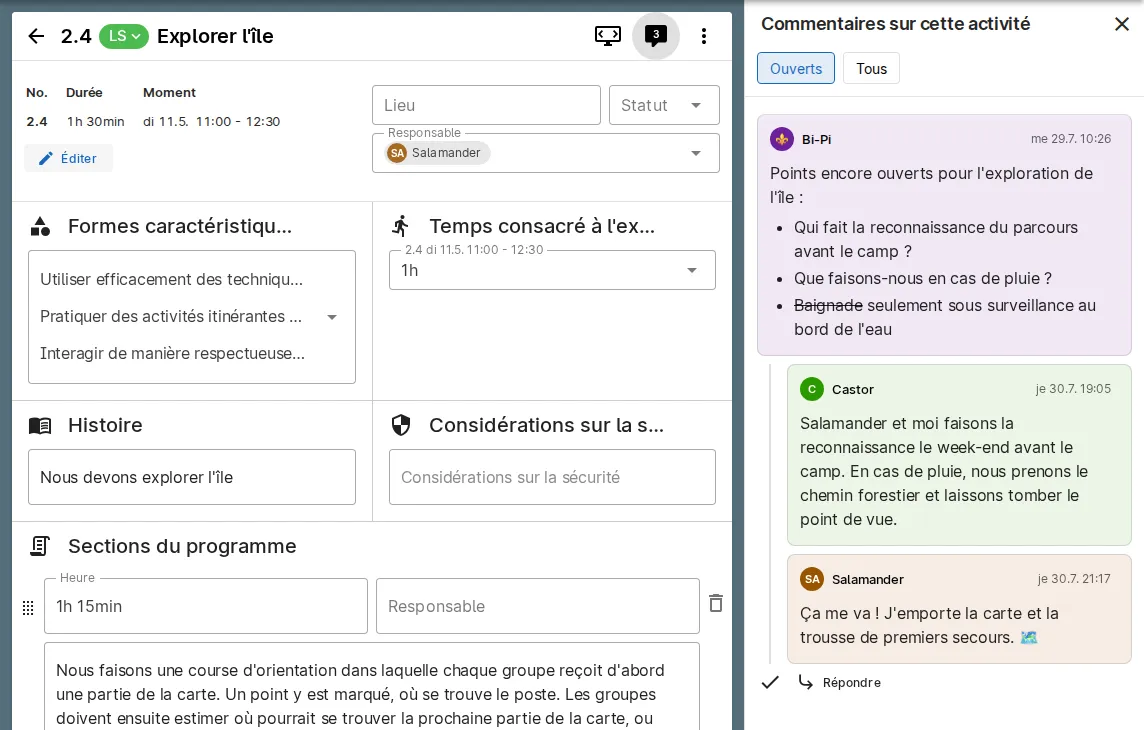
We are planning further extensions for comments in the future. Maybe it will become possible to comment on activities in the picasso or on the selected characteristics of Y+S 2027+, or maybe there will be an overview across all camps of the open comments that still concern you..? Let us know what you would like to see, and we’ll keep at it.
The new Y+S rules from 2027
From 2027 onwards, new rules apply to Y+S camps. eCamp supports them starting today, so you can already start planning your camps for 2027.
- There is a new camp template for Y+S camps from 2027. When creating a new camp, you can select this template and directly get everything you need for the new rules.
- With the new Y+S activity characteristics content block, you can select which characteristics are covered in each activity. The selected characteristics are also shown in the PDF. #11102 #11111 #11122
- With the new Y+S physical activity time content block, you can record the physical activity time of an activity. If an activity takes place multiple times or in multiple parts, the physical activity time can be entered separately for each occurrence. It is shown in the PDF and, if needed, also in the picasso. When printing the picasso, you can choose whether to include the physical activity time as well, for example to upload the picasso to the national sports database (BDNS). #11106 #11124 #11127
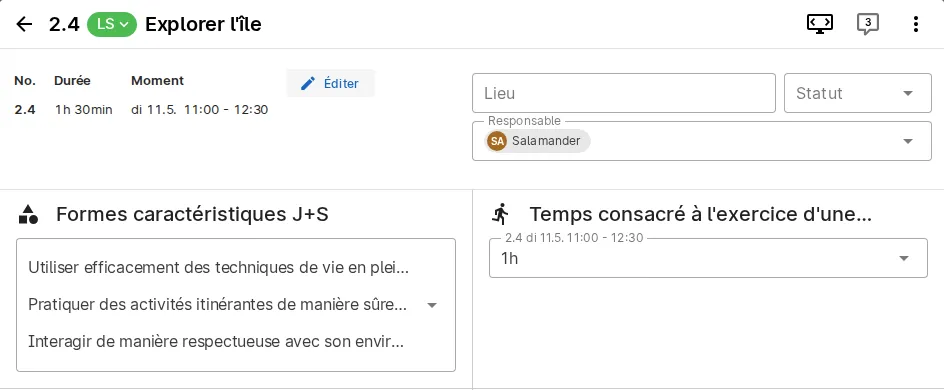
The new content blocks are also available in existing camps. So if you have already created your camp for 2027 using a different template, you can add them to your activities and categories afterwards. You can find more information in our FAQ.
Easier invitations
- You can now invite multiple people at once to a camp, by simply entering a list of email addresses. #9987
- When inviting, you can search for people you have already worked with in another camp, so you no longer need to know their email address by heart. #10199
Better protection for your account
- Changing your password now requires your current password. #10214
- Newly chosen passwords are checked against a list of commonly used and previously leaked passwords. Your password never leaves eCamp during this check. #10197
- We have further secured access to data of camps you are not part of. #10773 #10819
- Patched the recently disclosed security vulnerabilities in PHP (PHP2Shell) and Node.js. #11089 #11061
Usability & UI Tweaks
- The back button now returns to the overview you came from, even after switching between activities in the sidebar. Pressing Escape now cancels editing a title. #10650
- Material lists can now be renamed directly using the pen next to the title, and deleted via the menu. Thanks @Dagolix! #10742
- When adding material, you can now search for the material list and create a new list right away, without leaving the form. #11130
- The retry and cancel buttons in selection fields no longer open the dropdown at the same time. Thanks @fabiotro! #10736
- Notifications have been redesigned. When you click a notification, it stays open until you close it yourself. #10385 #11101
- Date ranges, for example of camp periods, are displayed more consistently and are easier to read. #11119
- A loading indicator is now shown while downloading the material list as an Excel file. #10055
- Missing and inconsistent translations have been fixed. #10383 #11122
- After an update of eCamp, the app now automatically reloads missing parts instead of showing an empty page. #10114
Bug fixes
- Guests now correctly see the checklists of a camp as read-only. #10722
- Checklist items are reliably shown in the correct order. #11115
- After sorting a list, for example the status labels, items are no longer shown twice. #11110
- The number of items in material lists is shown correctly again after deleting material, and material not assigned to a list can no longer be checked off. #11107 #10548
- Pasting a camp link while creating a camp works again in Firefox. #10519
- Numbers in the day overview in the PDF are now neatly aligned. #10816
- Fixed an error in the program that could occur in Safari. #10186
- After logging in with an external account, the browser’s back button works correctly again. #10034